
New Customer Hours
Mon - Sat: 9:00am - 5:00pm
Customer Care Hours
Mon - Sat: 9:00am - 5:00pm

The Hidden Energy Cost of Remote Work
Working from home may feel like a break from the daily grind, but how much energy does it really save compared to being in the office? A new survey of over 1,000 full-time employees digs into the power consumption of remote work setups compared to traditional office life. With most workers now dialing in from home, the findings offer eye-opening insights into how our daily habits impact electricity bills and energy efficiency.
Key Takeaways
- 3 in 5 remote and on-site workers believe working in the office is more energy draining than working from home.
- 2 in 3 remote workers wouldn’t give up any of their current devices or “power consumers” to save energy or reduce costs.
- On average, remote workers spend 2.3 hours on video calls every day, totaling 598 hours, or 75 working days, every year; 1 in 10 spend 5 or more hours on video calls every day.
Which Work Setting Uses More Energy?
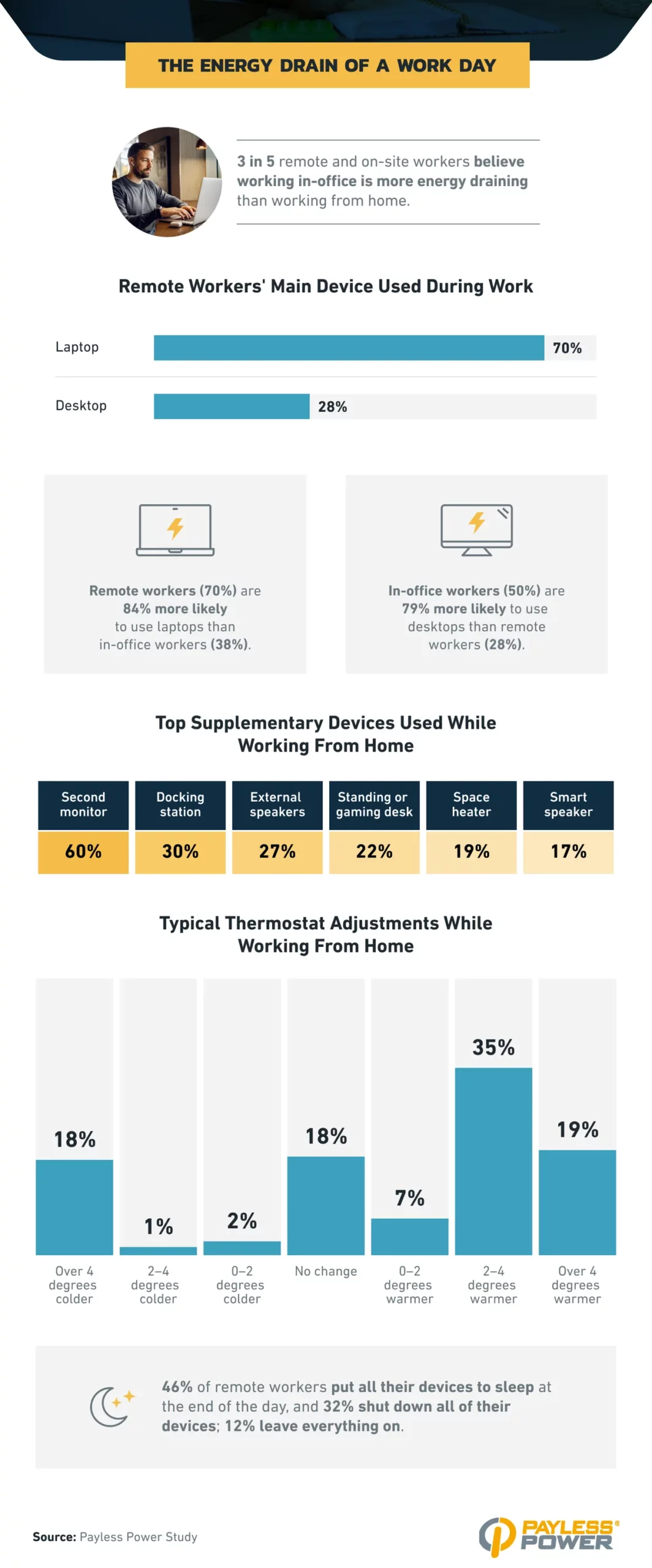
- 3 in 5 remote and on-site workers believe working in the office is more energy draining than working from home. According to research from the US Energy Information Administration residential electricity rate and past estimates of office building energy consumption, this is correct.
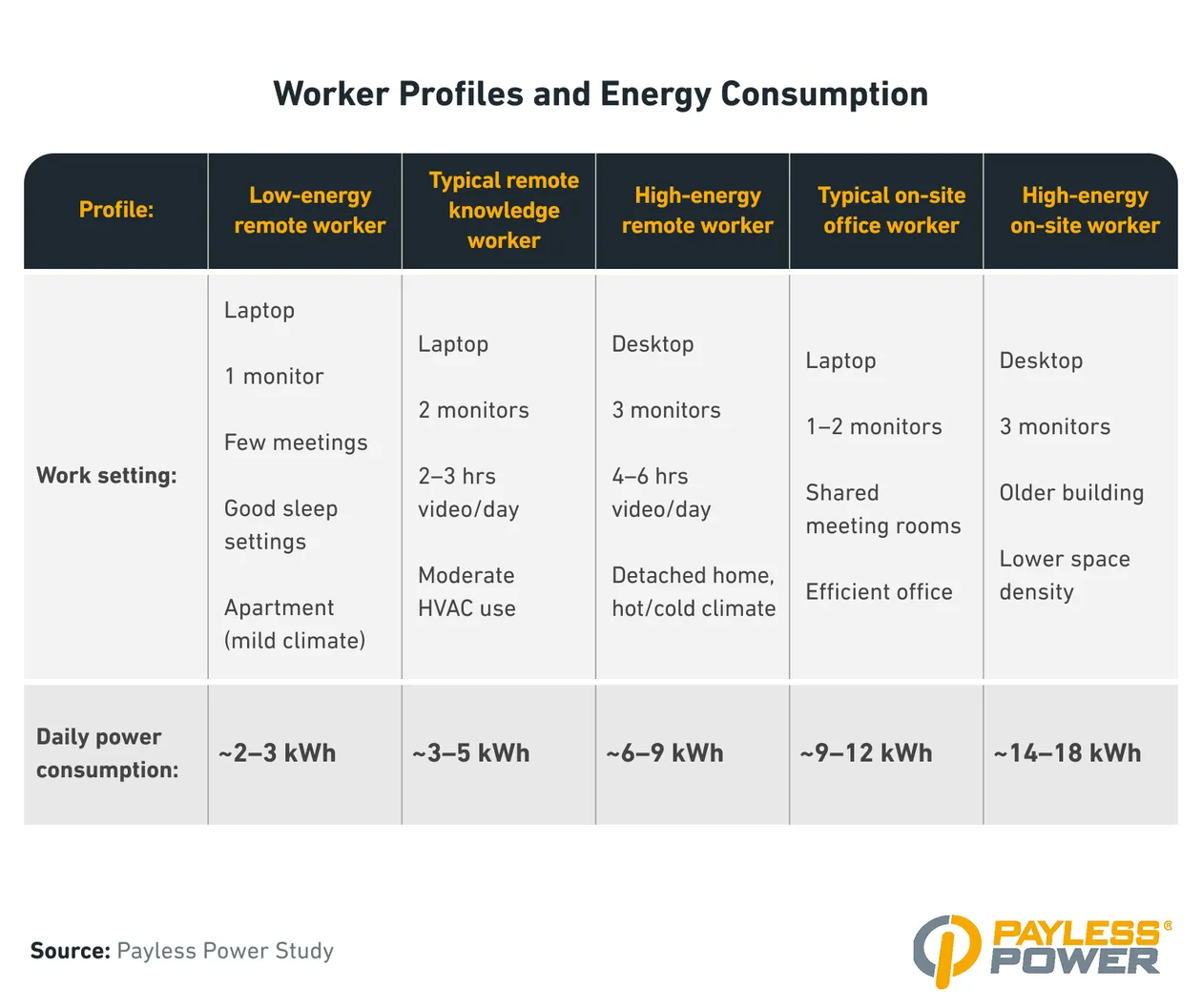
- Looking at energy costs alone, remote working costs between $0.38–$1.22 per day, while on-site working costs roughly $1.77 per day.
- Given this, remote working costs up to $317 in energy costs per year, while on-site working costs roughly $460 in energy costs per year.
- Remote workers prefer laptops (70%) to desktops (28%).
- In-office workers (50%) are 79% more likely to use desktops than remote workers (28%).
- According to EcoFlow, desktops consume 5 times more energy than laptops (roughly 2 kWh vs. 0.4 kWh).
- 60% of remote workers use a second monitor, 30% use docking stations, and 27% use external speakers.
- 54% of remote workers turn the thermostat up by at least 2 degrees while working.
- 46% of remote workers put all their devices to sleep at the end of the day, 32% shut down all of their devices, and 12% leave everything on.
Smart (or Not) Energy Habits at Home
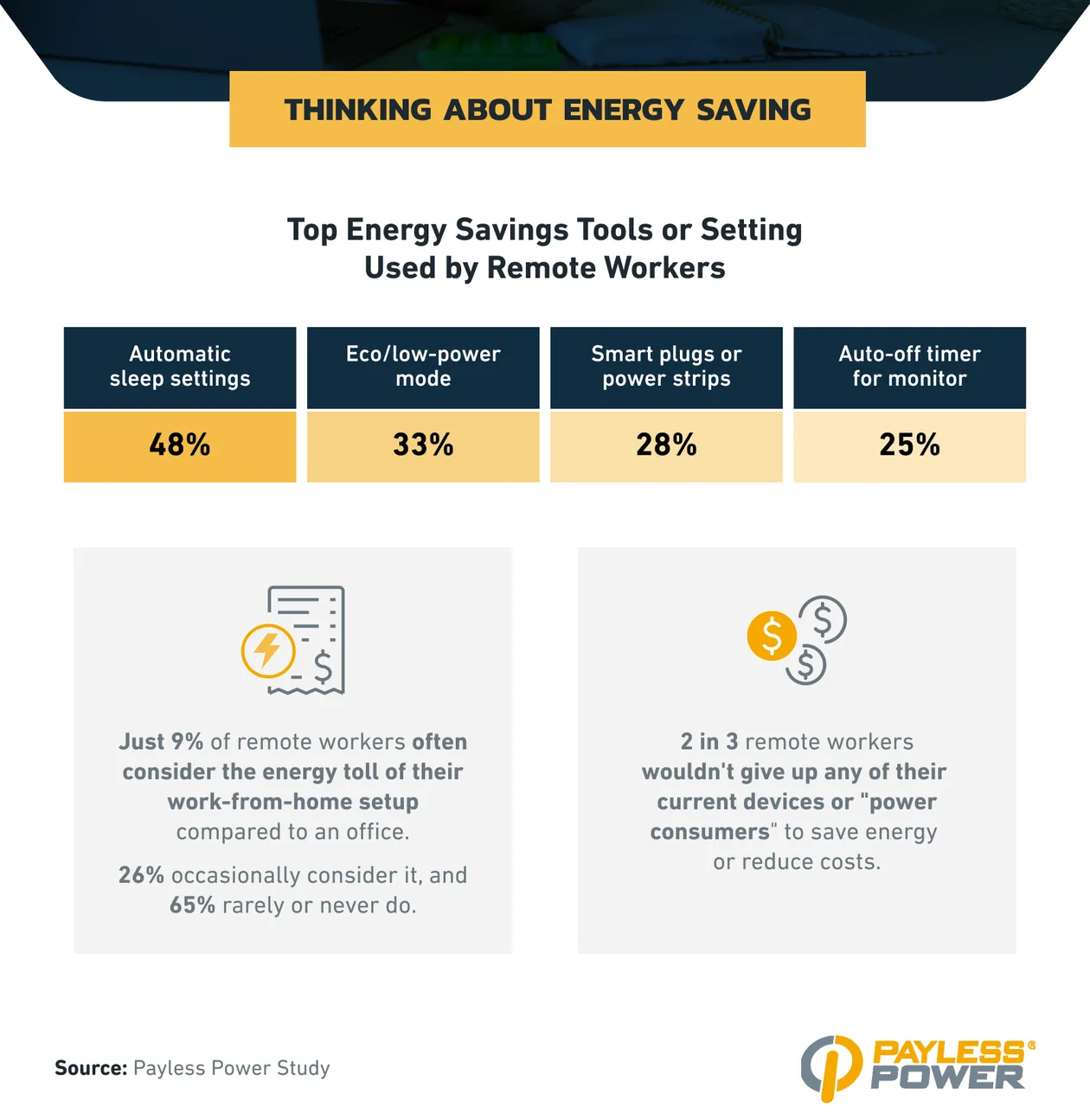
- 48% of remote workers use automatic sleep settings for their devices, 33% use eco/low-power mode, and 28% use smart plugs or power strips.
- Just 9% of remote workers often consider the energy toll of their work-from-home setup compared to an office; 26% occasionally consider it, and 65% rarely or never do.
- 2 in 3 remote workers wouldn’t give up any of their current devices or “power consumers” to save energy or reduce costs.
Video Calls: The Unexpected Power Drain
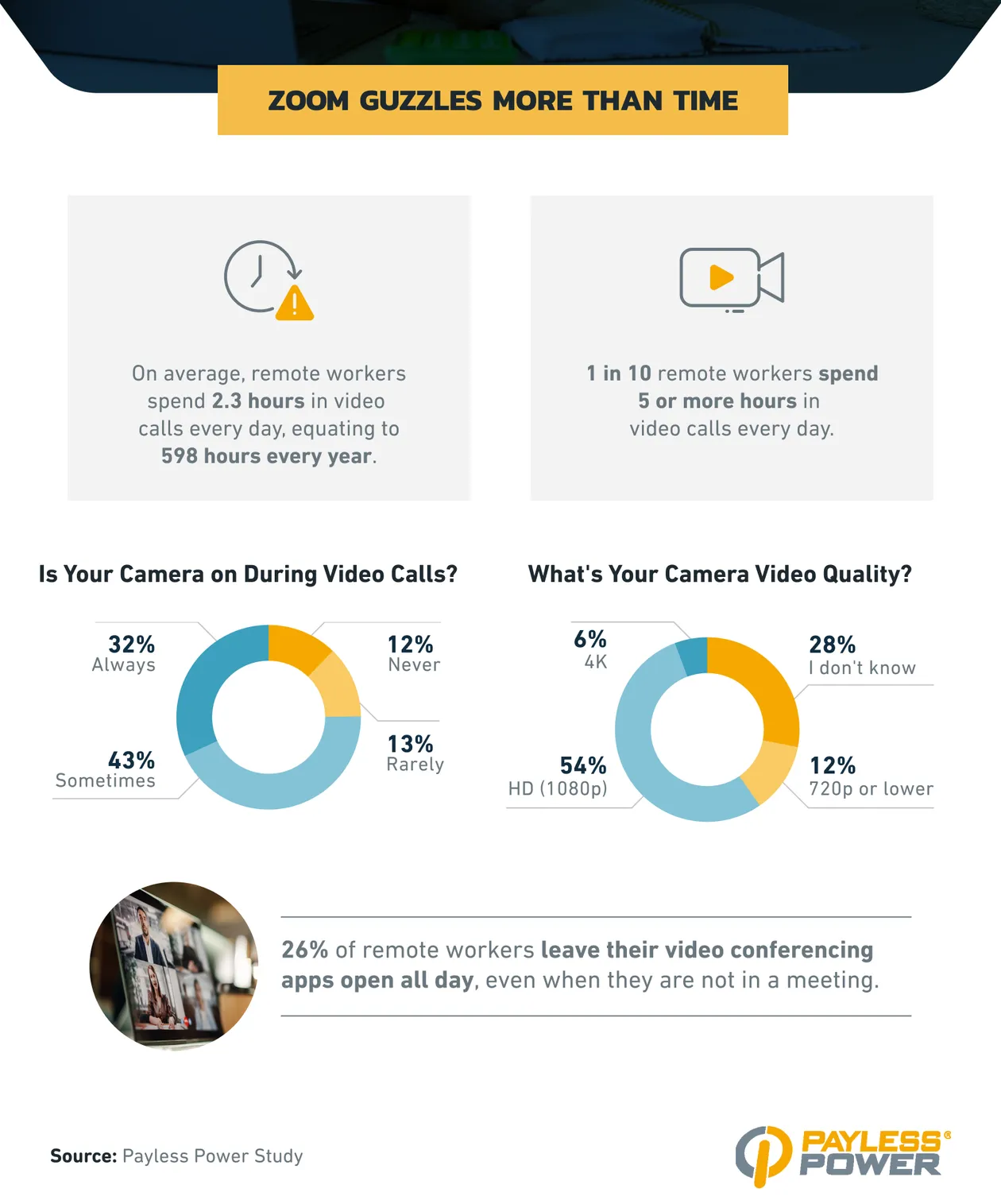
- On average, remote workers spend 2.3 hours on video calls each day, totaling 598 hours, or 75 working days, each year.
- Remote managers spend 2.4 hours on video calls per day, 2 times as much as on-site managers (1.2 hours).
- According to IEA, a 1-hour video call with a camera consumes 0.08 kWh.
- 1 in 10 remote workers spend 5 or more hours in video calls every day.
- Nearly 1 in 3 remote workers (32%) always have their cameras on during video meetings.
- 26% of remote workers leave their video conferencing apps open all day, even when they are not in a meeting.
Methodology
For this study, we surveyed 1,005 full-time employees about their work device usage to estimate their power consumption. Among respondents, 75% reported remote working.
About Payless Power
Payless Power offers affordable prepaid electricity plans for Texans who want to take control of their energy use and budget. Whether you work from home or commute to the office, Payless Power helps you keep costs low with no-deposit, no-credit-check plans that fit your lifestyle.
Fair Use Statement
If you’d like to share these findings, you’re welcome to do so for noncommercial purposes. Just be sure to link back to this page and credit Payless Power.
Payless Power is a thought leader in the energy industry, focusing on technology, innovation, and accessibility. The company's expertise includes the Texas energy grid, infrastructure improvements, weatherization safeguards, and the advancement of clean, renewable resources. Since 2005, Payless Power has provided energy solutions to residences and businesses across the Lone Star state.
Related Posts
-
 Prepaid Electricity Options for Tiny Homes in Texas – No Deposit Required
-
 The Future of Solar Energy: Innovations and Advancements
-
 The Role of Artificial Intelligence in Renewable Energy Management
-
 How Do Smart Thermostats Save Energy and Money
-
 Is Natural Gas Renewable?
-
 Top 10 Energy-Efficient Appliances You Should Have in Your Home
What our customers are saying
See why our power customers say we're the best electricity provider in Texas!

I was worried about getting electricity for my home through a prepaid company. I was calling around to see different rates then going through all the hassle of credit checks while dropping points each…
I have been with this company for several years and have been very happy since. Even when I moved, they made my usually stressful situation very easy and carefree. I recommend them to everyone that I…
I have enjoyed the service for 2 years now. In the beginning this service was planned to be temporary but with the service being so effective for me i decided to keep it for the long haul. I’m a happy customer.
*Same-day connection is available Monday through Saturday when you fund your account before 6:00 PM. Accounts funded after 6:00 PM, on Sundays, or on holidays will be connected first thing the next morning. Actual timing depends on your local utility company. Connection times are not guaranteed and may be delayed due to meter issues, switch holds, system outages, or weather. Our support team is always standing by to help.
About Payless Power
Payless Power wants to be your Texas electric company.
Whether you live in a large city or small town, Payless Power can save you money on your Texas electricity. We serve customers in over 400 deregulated communities in Texas with both traditional, postpaid plans on monthly billing cycles, and prepaid electricity that is pay-as-you-go with no deposit or credit check required.
We work with principal utilities throughout the state to provide electricity. The utilities are: Oncor in the Dallas and Fort Worth Metroplex and various parts of West Texas; CenterPoint Energy in Houston and the surrounding areas; AEP Central in Corpus Christi and surrounding areas; and AEP North in Abilene and other North Texas communities.